Showing posts with label Email. Show all posts

Gmail accidentally resetting system 500,000 Gmail users lost access to their inboxes


According to Engadget, Google has just confirmed that as many as 500,000 Gmail users (or 0.29% of the total as per Google) have just had their accounts reset. Effectively, they have, as of now, lost a whole lotta emails, attachments, labels, folders and chat logs! Those affected by this unfortunate accident are now greeted with Gmail’s welcome messages, with their previous data missing. The latest update from the Google blog tells: 
"Google Mail service has already been restored for some users, and we expect a resolution for all users in the near future. Please note this time frame is an estimate and may change."

Google begins create 2-step verification when login for some account


Over the next few days you should see a link on your Google Account Settings page that allows you to enabled 2-step verification. This new feature adds an extra layer of security to your Google account by requiring a special passcode in addition to your normal password.
Once you join the program, Google will prompt you for a five to eight-digit verification code that you will get from your phone. If you want to avoid re-entering a code every time you access your account, Google has included an option to “Remember verification for this computer for 30 days.” You can also generate a one-time, application-specific password if you need to sign in to your Google account from non-browser based app that is designed to only ask for a password, and cannot ask for the passcode.

Gmail new feature: allows you to revert your contact list and undo any mistakes up to 30 days


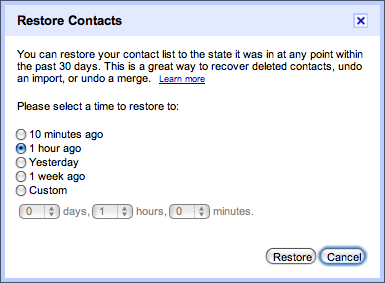
If you’ve ever accidentally deleted a contact from your Gmail address book, you know what pain is. The action has been, since the inception of the contacts feature, irreversible. But that all changes today. Google has announced a new “restore contacts” feature that will grant those whom have accidentally deleted a contact 30-days of clemency.
Google blog say : 
"We’ve added a new feature to Google Contacts that allows you to revert your contact list and undo any mistakes made up to 30 days in the past. Let’s say you accidentally deleted a bunch of contacts or wiped the contact data from your Gmail account by mistake while syncing to another device. Visit Gmail’s Contacts section, select “Restore contacts” in the “More actions” menu, and choose the time you would like to revert to.
Your contacts will be restored to exactly the same state they were in at that time — any contacts that didn’t exist then will be deleted and any that have since been added will be deleted. "

E-mail delegation - Manager Multiple Gmail Accounts Easier


Google’s announced yet another awesome Gmail feature today. Called e-mail delegation, the feature will allow you to easily manage multiple Gmail accounts without signing in and out of Gmail and switching accounts manually. Originally, e-mail delegation was useful for granting others access to your primary Gmail account — personal assistants, for example.

When you sign into your primary Gmail account, you can choose to grant access to another account. Just navigate to your Gmail settings by clicking the link in the top right corner of Gmail’s web interface.
Under the Accounts tab, there’s now a new section entitled, “Grant access to your account.” Here, you can add any other Gmail accounts you control to your primary Gmail account.
When you add an account, you’ll have to accept access from a verification e-mail sent to the to-be-added account. Once the account is successfully added, you can simply toggle between your Gmail accounts without logging in and out. Also, when you send a new e-mail message while signed into a secondary account, your primary address will also appear in the e-mail details.

Trillian Astra 4.2 - chatting on Astra, Windows Live, Facebook, Yahoo, MySpace, AIM, Email, Google Talk, Skype

Trillian is a fully featured, stand-alone, skinnable chat client that supports chatting on Astra, Windows Live, Facebook, Yahoo, MySpace, AIM, Email, Google Talk, Skype, ICQ, Jabber, IRC, Bonjour and others. It also helps manage your social networks such as Facebook and Twitter.


How to Check if Your Gmail Account Has Been Hacked


If you’re worried about email security, here is a step by step guide to help you check and determine if your Gmail account has been hacked or compromised in any way.

Step 1: Find the ‘Last Account Activity’ Section Your Inbox

 At the bottom of your Gmail inbox there is a ‘Last Account Activity’ section.  Click on ‘details’ to launch the full blown monitor.