Showing posts with label gmail. Show all posts

Gmail accidentally resetting system 500,000 Gmail users lost access to their inboxes


According to Engadget, Google has just confirmed that as many as 500,000 Gmail users (or 0.29% of the total as per Google) have just had their accounts reset. Effectively, they have, as of now, lost a whole lotta emails, attachments, labels, folders and chat logs! Those affected by this unfortunate accident are now greeted with Gmail’s welcome messages, with their previous data missing. The latest update from the Google blog tells: 
"Google Mail service has already been restored for some users, and we expect a resolution for all users in the near future. Please note this time frame is an estimate and may change."

Google extended free calling in Gmail through 2011


Google announced Monday the extension of a free calling initiative for U.S.-based Gmail users that was set to expire this month. "In the spirit of holiday giving and to help people keep in touch in the new year, Google extending free calling for all of 2011". The promotion applies to all calls made from within Gmail, and is completely separate from Google Voice, which also affords free calling to the U.S. and Canada. Gmail’s recently added voice calling feature is thought to be a prelude to the eventual addition of VoIP services to Google Voice.

Calling in Gmail is currently only available to U.S. based Gmail users.

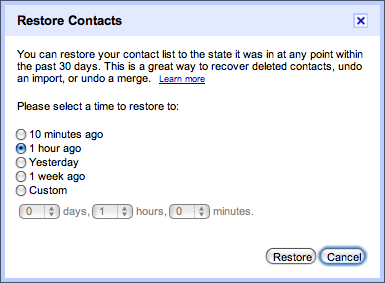
Gmail new feature: allows you to revert your contact list and undo any mistakes up to 30 days


If you’ve ever accidentally deleted a contact from your Gmail address book, you know what pain is. The action has been, since the inception of the contacts feature, irreversible. But that all changes today. Google has announced a new “restore contacts” feature that will grant those whom have accidentally deleted a contact 30-days of clemency.
Google blog say : 
"We’ve added a new feature to Google Contacts that allows you to revert your contact list and undo any mistakes made up to 30 days in the past. Let’s say you accidentally deleted a bunch of contacts or wiped the contact data from your Gmail account by mistake while syncing to another device. Visit Gmail’s Contacts section, select “Restore contacts” in the “More actions” menu, and choose the time you would like to revert to.
Your contacts will be restored to exactly the same state they were in at that time — any contacts that didn’t exist then will be deleted and any that have since been added will be deleted. "

E-mail delegation - Manager Multiple Gmail Accounts Easier


Google’s announced yet another awesome Gmail feature today. Called e-mail delegation, the feature will allow you to easily manage multiple Gmail accounts without signing in and out of Gmail and switching accounts manually. Originally, e-mail delegation was useful for granting others access to your primary Gmail account — personal assistants, for example.

When you sign into your primary Gmail account, you can choose to grant access to another account. Just navigate to your Gmail settings by clicking the link in the top right corner of Gmail’s web interface.
Under the Accounts tab, there’s now a new section entitled, “Grant access to your account.” Here, you can add any other Gmail accounts you control to your primary Gmail account.
When you add an account, you’ll have to accept access from a verification e-mail sent to the to-be-added account. Once the account is successfully added, you can simply toggle between your Gmail accounts without logging in and out. Also, when you send a new e-mail message while signed into a secondary account, your primary address will also appear in the e-mail details.

What to do if locked out of Gmail

What to do if you're locked out of Gmail? It's a question too many users ask, after they are already locked out and are attempting to recover their account. Given the incredible amount of personal and financial information we keep in our inboxes, gaining access to a compromised Gmail account is incredibly important. Here's how to recover your Gmail account, and what you can do now, to make a future recovery easier.


How to Check if Your Gmail Account Has Been Hacked


If you’re worried about email security, here is a step by step guide to help you check and determine if your Gmail account has been hacked or compromised in any way.

Step 1: Find the ‘Last Account Activity’ Section Your Inbox

 At the bottom of your Gmail inbox there is a ‘Last Account Activity’ section.  Click on ‘details’ to launch the full blown monitor.

How to Integrate Facebook, Twitter and Buzz into Your Gmail


Gadget Integration Is Your Friend

 Yesterday we caught a Buzz post by Ari Milner where he described how he turned his Gmail into his personal “social command center.” How did he do it? In his words:
“The key was using Gmail Labs feature at the bottom of the list called ‘Add any gadget by URL’. This allowed me to add these 3 features to my Gmail sidebar.”